
MetaTechX BlogSpot | Electrical & Automation | Steel Industry | Industrial Maintenance
Walk into a modern steel plant and you will find an enormous amount of machinery operating together.
Motors start and stop.
Hydraulic cylinders move.
Valves open and close.
Sensors detect material.
Encoders measure speed.
Drives control motors.
Alarms appear on operator screens.
Production sequences run automatically.
But behind much of this coordinated activity is one of the most important technologies in industrial automation:
PLC — Programmable Logic Controller
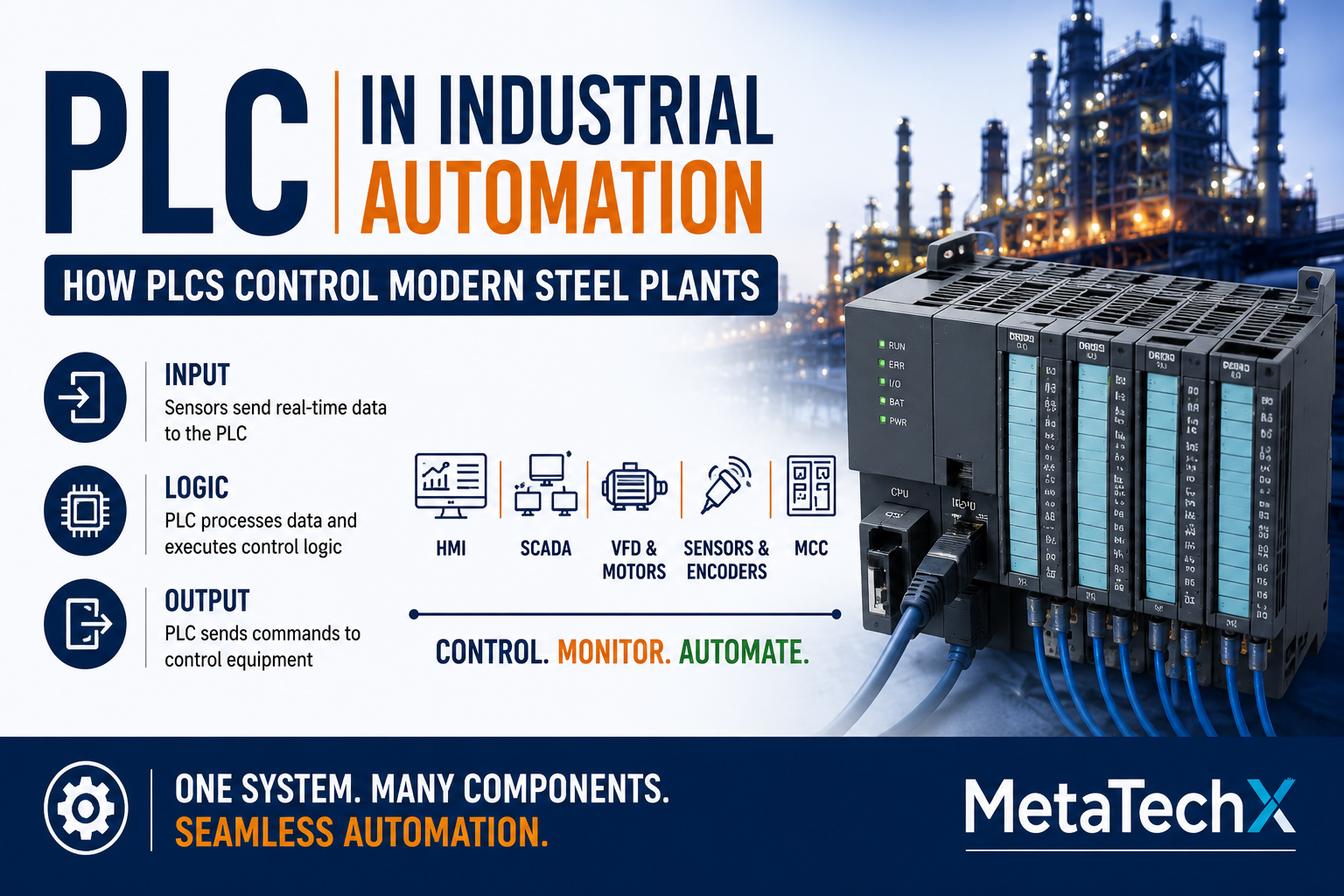
A PLC is an industrial control system designed to monitor inputs, execute programmed logic and control outputs.
In steel plants, rolling mills, tube mills, continuous casting facilities and manufacturing lines, PLCs can form the core of machine-level automation.
Understanding PLCs is therefore one of the most valuable skills for modern electrical engineers, automation engineers, instrumentation engineers, maintenance technicians and technically skilled mechanical professionals.
What Is a PLC?
A Programmable Logic Controller (PLC) is a rugged industrial computer designed specifically for monitoring and controlling machines and industrial processes.
A simplified PLC operation is:
INPUT → PROCESS/LOGIC → OUTPUT
The PLC receives information from field devices.
It processes that information according to its programmed logic.
It then sends commands to output devices.
For example:
Proximity Sensor
↓
PLC Input
↓
PLC Logic
↓
PLC Output
↓
Solenoid Valve
↓
Cylinder Moves
The PLC continuously repeats this process.
Why Are PLCs Used in Steel Plants?
Steel plants contain complex processes where equipment must operate in a precise sequence.
Examples include:
Reheating furnaces
Rolling mills
Continuous casting
Induction furnace systems
Cooling systems
Hydraulic systems
Material handling
Coil handling
Tube mills
Shearing systems
Straightening machines
Conveyor systems
A PLC can coordinate multiple devices and conditions simultaneously.
For example, before a rolling mill motor is allowed to start, the PLC may check:
Emergency stop healthy
Lubrication pressure available
Hydraulic pressure available
Cooling system available
Drive ready
Guard conditions satisfied
No active critical fault
Previous sequence completed
Only when the required conditions are satisfied does the PLC permit the operation.
This is one reason PLC knowledge is so important for industrial troubleshooting.
Basic PLC Architecture
A typical PLC system contains several major components.
1. CPU
The CPU is the central processing unit.
It executes the control program and processes input/output information.
2. Power Supply
The PLC requires an appropriate power source.
Depending on the system, control power may be supplied through an industrial DC or AC power arrangement.
The power supply must be checked carefully during troubleshooting.
3. Input Modules
Input modules receive signals from field devices.
Examples include:
Push buttons
Proximity sensors
Limit switches
Pressure switches
Level switches
Temperature signals
Encoders
Other instrumentation
Inputs can be digital or analog.
4. Output Modules
Output modules send commands to field devices.
Examples include:
Relays
Contactors
Solenoid valves
Lamps
Control devices
Drive commands
Outputs can also be digital or analog.
5. Communication Modules
Modern PLC systems may communicate with:
HMI
SCADA
VFDs
Remote I/O
Other PLCs
Robots
Industrial instruments
Communication therefore becomes an important part of modern PLC systems.
Digital Inputs and Outputs
Digital signals generally represent two states.
ON / OFF
or
TRUE / FALSE
Examples of digital inputs:
Push button
Proximity sensor
Limit switch
Auxiliary contact
Examples of digital outputs:
Contactor
Solenoid valve
Relay
Indicator
A simple example:
Limit Switch = ON
↓
PLC receives input
↓
PLC checks logic
↓
PLC activates output
↓
Machine stops
This simple sequence exists in many forms throughout industrial machinery.
Analog Inputs and Outputs
Industrial processes also require continuously varying values.
Examples include:
Temperature
Pressure
Flow
Level
Speed
Position
Common analog signals include:
4–20 mA
and
0–10 V
For example:
Pressure Transmitter
↓
4–20 mA Signal
↓
PLC Analog Input
↓
PLC Scaling
↓
HMI Display
↓
Operator sees Pressure
If the displayed value is incorrect, the problem may not be the transmitter.
The engineer may need to check:
Transmitter → Wiring → Analog Module → Configuration → Scaling → HMI
This is an important troubleshooting principle.
How a PLC Controls a Motor
Consider a conveyor motor.
The operator presses START.
The PLC receives the command.
The PLC checks the required interlocks.
If all conditions are satisfied:
PLC Output = ON
The output may command a contactor or VFD.
The motor starts.
A feedback signal may then confirm:
Motor Running = TRUE
The HMI displays the status.
This can be represented as:
START → PLC → INTERLOCKS → OUTPUT → VFD/CONTACTOR → MOTOR → FEEDBACK
Understanding this chain is fundamental for industrial maintenance.
What Are PLC Interlocks?
Interlocks prevent equipment from operating when certain conditions are not satisfied.
For example:
A motor may require:
Emergency Stop Healthy
AND
Drive Ready
AND
Lubrication OK
AND
Hydraulic Pressure OK
AND
Cooling Available
AND
No Critical Fault
Only then:
Motor Start Permitted
If even one required condition is FALSE, the motor may not start.
This is why engineers should not immediately conclude:
“The PLC is faulty.”
The PLC may simply be correctly preventing an unsafe or incorrect operation.
What Are Permissives?
A permissive is a condition that must be satisfied before an operation is allowed.
For example:
Pump Start Permissives
Tank level sufficient
Valve position correct
No motor fault
Emergency stop healthy
Required process condition satisfied
Once all permissives are satisfied:
Start Command Allowed
Understanding permissives and interlocks is essential for troubleshooting automated equipment.
PLC Scan Cycle
One of the basic concepts every PLC engineer should understand is the scan cycle.
In simplified form, the PLC repeatedly:
1. Reads Inputs
The PLC obtains information from its input system.
2. Executes the Program
The CPU processes the programmed logic.
3. Updates Outputs
The PLC sends output commands.
4. Repeats
The cycle continues continuously.
A simplified representation is:
Read Inputs
↓
Execute Logic
↓
Update Outputs
↓
Diagnostics/Communication
↓
Repeat
Actual PLC architectures and execution behaviour vary by manufacturer and configuration, but this model is useful for understanding PLC operation.
PLC Programming Languages
PLC programming can use several standardized or manufacturer-specific approaches.
Common IEC 61131-3 programming languages include:
Ladder Diagram
Function Block Diagram
Structured Text
Sequential Function Chart
Ladder Logic
Ladder logic is particularly familiar to maintenance and electrical professionals because its structure resembles traditional relay control concepts.
For example:
START
AND
Safety OK
AND
Drive Ready
↓
Motor Run
This makes ladder logic useful for understanding industrial control sequences.
PLC and HMI: What Is the Difference?
The PLC and HMI perform different functions.
PLC
Controls the process.
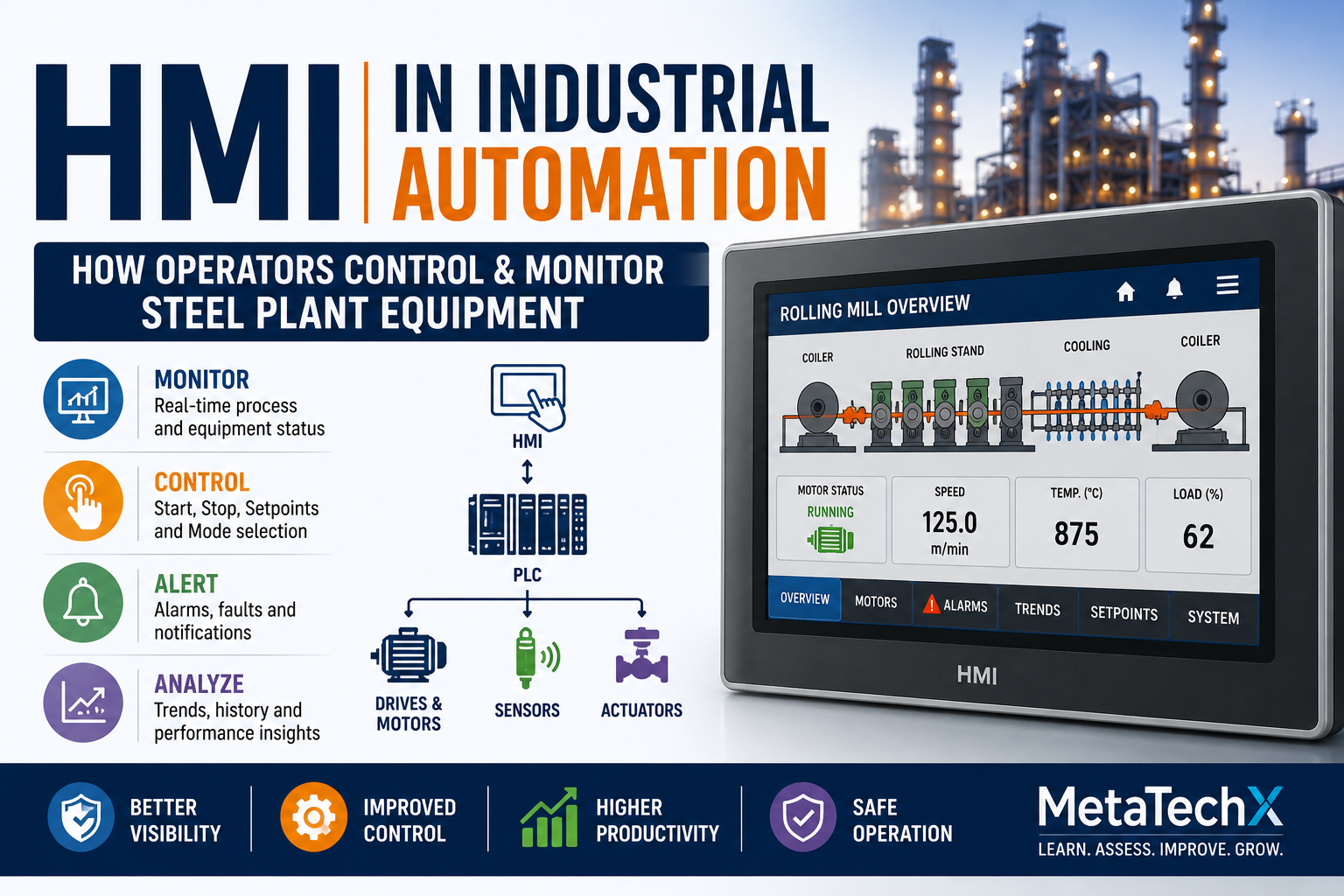
HMI
Provides an interface between the operator and the process.
For example:
Operator presses:
START
on the HMI.
↓
HMI sends command
↓
PLC receives command
↓
PLC checks logic
↓
PLC activates output
↓
Machine starts
The HMI provides the interface.
The PLC performs the control logic.
Our next article in this series will examine HMI in detail.
PLC and SCADA
SCADA operates at a broader supervisory level.
A simplified relationship may look like:
Field Devices
↓
PLC
↓
HMI
↓
SCADA
The PLC handles machine/process control.
The HMI provides local operator interaction.
SCADA can provide broader supervisory monitoring, visualization and data acquisition.
Large steel plants may contain multiple PLCs integrated into wider automation architectures.
PLC and VFD
A PLC frequently communicates with or controls a VFD.
A simplified arrangement is:
PLC
↓
Run Command
↓
VFD
↓
Motor
The PLC may also provide a speed reference.
For example:
PLC → Speed Reference → VFD → Motor
Feedback may travel in the opposite direction:
Motor/Encoder → Feedback → PLC
This creates a closed-loop or monitored control system depending on the application.
PLC and Sensors
Sensors provide information about the physical process.
Consider a rolling mill conveyor.
A proximity sensor detects material.
↓
PLC receives signal.
↓
PLC determines material position.
↓
PLC controls the next sequence.
Without reliable sensor information, the PLC cannot make the correct decision.
This is why sensor troubleshooting is an essential PLC troubleshooting skill.
Common PLC Problems Engineers Encounter
Not every automation failure is a PLC hardware failure.
Common problems include:
PLC has no power
Possible causes:
Power supply failure
Fuse/MCB issue
Loose wiring
Power module problem
Input not changing
Possible causes:
Sensor failure
Wiring fault
No sensor supply
Incorrect addressing
Input module issue
Output not activating
Possible causes:
Logic condition not satisfied
Interlock active
Incorrect address
Output module issue
Program condition
CPU fault
Possible causes:
Hardware fault
Program/configuration issue
Module problem
Communication issue
Communication failure
Possible causes:
Network problem
Device power loss
Configuration mismatch
Communication module issue
The correct approach is systematic diagnosis.
PLC Troubleshooting: Follow the Signal
Suppose an automated machine is not operating.
Do not immediately replace the PLC.
Instead, follow the control chain.
Step 1 — Check the command
Is the operator command reaching the PLC?
Step 2 — Check the inputs
Are the required field signals present?
Step 3 — Check the interlocks
Which condition is preventing operation?
Step 4 — Check the logic
Is the program producing the expected result?
Step 5 — Check the output
Is the required PLC output active?
Step 6 — Check the field device
Is the contactor, relay, solenoid or VFD responding?
Step 7 — Check the machine
Can the mechanical equipment physically perform the requested action?
Step 8 — Check feedback
Is the expected feedback reaching the PLC?
This approach can be summarized as:
COMMAND → INPUT → LOGIC → OUTPUT → DEVICE → MACHINE → FEEDBACK
Example: Rolling Mill Motor Does Not Start
Imagine an operator presses START on a rolling mill motor.
The motor does not start.
A systematic investigation might reveal:
START Command = TRUE
↓
PLC Input = TRUE
↓
Drive Ready = TRUE
↓
Hydraulic Pressure = TRUE
↓
Lubrication = TRUE
↓
Emergency Stop = Healthy
↓
PLC Output = TRUE
↓
VFD Run Command = TRUE
↓
VFD Fault = ACTIVE
The PLC is functioning correctly.
The actual problem is downstream:
VFD fault
This is a good example of why engineers should avoid blaming the PLC without evidence.
Another Example: Conveyor Does Not Start
Suppose:
PLC Output = OFF
The engineer checks the logic.
A start permissive is FALSE.
The missing condition is:
Material Sensor = FALSE
The sensor is physically detecting material, but the PLC input remains OFF.
Further investigation finds:
Sensor cable damaged.
The PLC is healthy.
The problem is in the field instrumentation.
Again:
Follow the signal.
PLC Troubleshooting Mistakes to Avoid
❌ Replacing the PLC without diagnosis
The PLC is often blamed because it is the central component.
❌ Ignoring sensors
A simple field-device failure can stop an entire automated sequence.
❌ Ignoring interlocks
The machine may be intentionally prevented from operating.
❌ Resetting faults repeatedly
A reset may temporarily restore operation without fixing the root cause.
❌ Changing the program unnecessarily
Uncontrolled logic changes can create new problems.
❌ Ignoring documentation
Without records, repeated failures become harder to analyse.
PLC Safety Considerations
PLC troubleshooting may require interaction with energized control panels and operating machinery.
Depending on the task and plant procedures, appropriate safety practices may include:
Electrical isolation
Lockout/Tagout
Permit-to-work
Appropriate PPE
Machine guarding
Safe test equipment
Stored-energy control
Approved diagnostic procedures
Never bypass safety interlocks merely to make equipment run.
A safety system should only be modified or tested according to approved procedures and by authorized personnel.
Why PLC Knowledge Matters for Mechanical Engineers
A modern mechanical machine is rarely purely mechanical.
A rolling mill may contain:
Gearbox + Motor + VFD + PLC + Sensors + Encoder + Hydraulic System
A mechanical engineer who understands basic PLC operation can communicate much more effectively with electrical and automation teams.
For example, instead of saying:
“The machine is not working.”
they can say:
“The mechanical equipment is available, but the PLC is not receiving the position feedback.”
That is a much more useful technical diagnosis.
Why PLC Knowledge Matters for Electrical Engineers
Electrical engineers working in industrial maintenance increasingly encounter integrated control systems.
They need to understand:
Power → Motor → Drive → PLC → Sensor → HMI
A motor fault may originate from a control-system condition.
A PLC fault may be caused by a field device.
A drive may be healthy but inhibited by a PLC interlock.
Understanding the complete system makes troubleshooting faster and more accurate.
Why PLC Knowledge Matters for Freshers
Fresh engineers and technicians do not need to become expert PLC programmers immediately.
But they should understand:
PLC architecture
Digital I/O
Analog I/O
Sensors
Outputs
Interlocks
Permissives
Basic ladder logic
HMI communication
VFD interaction
Troubleshooting principles
This foundation can make the transition from academic learning to industrial work much easier.
Skills a PLC Engineer Should Develop
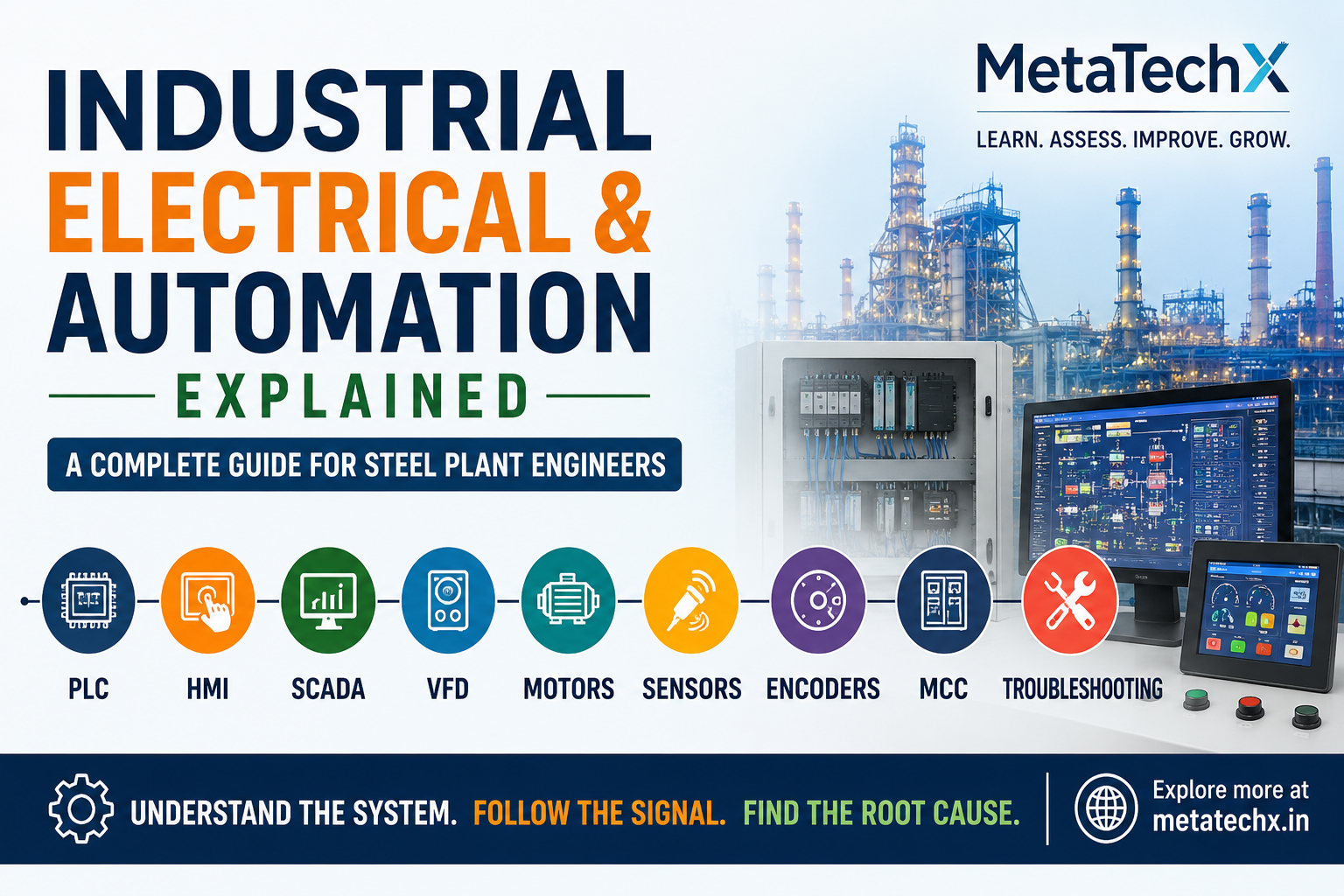
A strong industrial automation professional should develop skills in:
PLC
I/O
Programming
Diagnostics
Logic
Sequences
HMI
Tags
Alarms
Trends
Operator commands
SCADA
Monitoring
Data
Alarms
Communication
Drives
VFD
Parameters
Fault diagnosis
Instrumentation
Sensors
Transmitters
Encoders
Electrical
Motors
MCC
Contactors
Protection
Troubleshooting
Signal tracing
Interlocks
Root-cause analysis
Industrial Networking
PLC communication
Remote I/O
Drive communication
The Future of PLC Technology
Industrial automation continues to become more connected.
PLCs increasingly operate as part of larger systems involving:
Industrial Ethernet
Remote I/O
SCADA
Data historians
Manufacturing systems
Cloud-connected applications
Industrial IoT
Advanced analytics
This means future automation professionals will need more than programming skills.
They will need to understand:
Control + Communication + Data + Equipment
PLC Skills and Industrial Careers
As automation becomes more important in manufacturing, technical professionals with PLC knowledge can work across areas such as:
Steel plants
Rolling mills
Tube mills
Automotive manufacturing
Process industries
Power systems
Material handling
Packaging
Machine building
Industrial maintenance
The exact requirements vary by role, plant and technology platform.
But the ability to understand industrial control systems is increasingly valuable.
Assess Your Electrical & Automation Knowledge
Knowing the terminology is one thing.
Being able to apply it is another.
Technical professionals can use structured skill assessments to identify strengths and areas where additional learning may be useful.
MetaTechX GetCertified provides professional skill assessments covering areas including:
Electrical & Automation
Mill Equipment & Maintenance
Operations & Production
Steel & Tube Industries
Assessment should complement education, practical experience, interviews and hands-on evaluation.
Learn. Assess. Improve. Demonstrate.
Explore MetaTechX GetCertified
What's Next in the Series?
Understanding the PLC is only the beginning.
The next question is:
How does the operator actually interact with the PLC-controlled machine?
That is where the HMI — Human Machine Interface comes in.
Next Article:
HMI in Industrial Automation: How Operators Control and Monitor Steel Plant Equipment
We will explore:
HMI screens → Tags → Commands → Alarms → Trends → Setpoints → PLC communication → Troubleshooting
Final Takeaway
A PLC is much more than a programmable electronic device.
It is the decision-making component at the heart of many industrial automation systems.
The basic concept is simple:
INPUT → LOGIC → OUTPUT
But modern steel plants make that system highly interconnected.
Sensors provide information.
PLCs process it.
Interlocks protect the process.
Outputs control equipment.
VFDs control motors.
Encoders provide feedback.
HMI and SCADA allow people to monitor the system.
When something goes wrong, the engineer's job is not to guess.
Follow the signal.
Understand the logic.
Find the root cause.
That is the foundation of professional PLC troubleshooting.
MetaTechX BlogSpot
Industry • Technology • Skills • Careers
Comments 0
Be the first to share your thoughts.
Leave a comment
Your comment will appear after a quick moderation check.